Credit Card Payments
This page explains how to make credit card payments on NDC bookings. Due to PCI-DSS compliance requirements, credit card data cannot pass through the TUI NDC proxy on production. Instead, the payment step is sent directly to Navitaire.
This only applies to credit card payments on the production environment. On playground/test, credit card data can be included in OrderChange through the TUI proxy for testing purposes. All other payment types (AGT, CA, OT) can be included directly in the OrderCreate step via the TUI proxy on any environment.
How it works
The booking is created without payment (on-hold), and then the partner sends the credit card payment directly to Navitaire using an NDC OrderChange request.
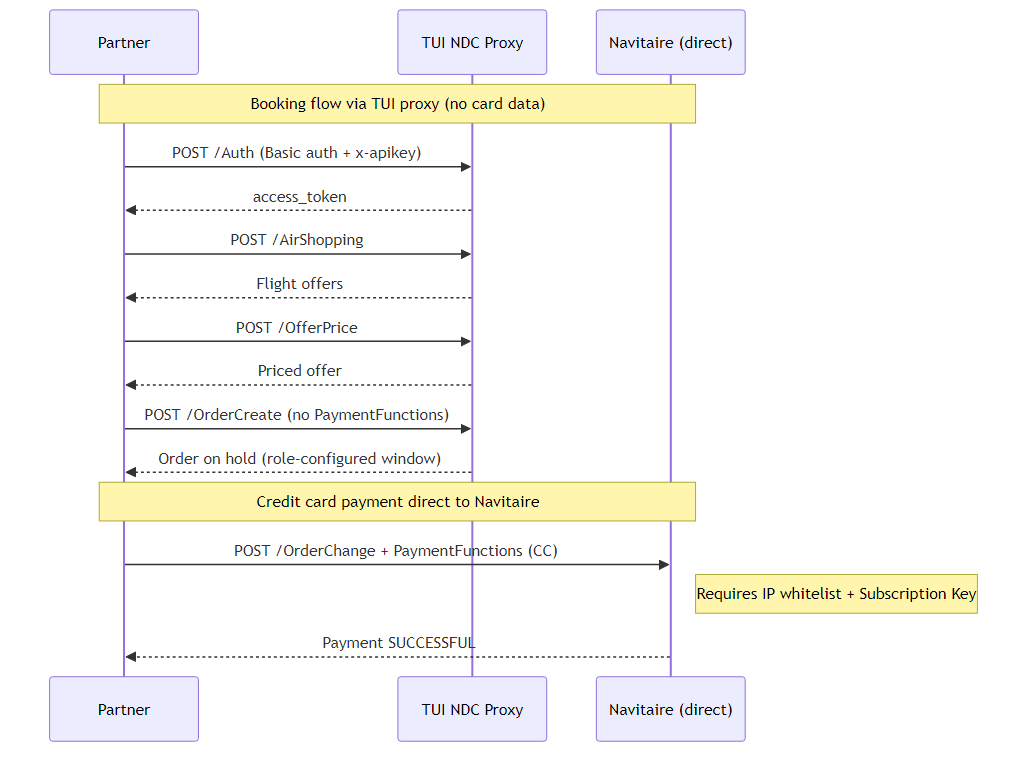
| Step | Operation | Target |
|---|---|---|
| 1 | Auth | TUI NDC Proxy |
| 2 | AirShopping | TUI NDC Proxy |
| 3 | OfferPrice | TUI NDC Proxy |
| 4 | OrderCreate (no PaymentFunctions) | TUI NDC Proxy |
| 5 | OrderChange (CC payment) | Navitaire directly (prod only) |
Steps 1 through 4 use the standard TUI proxy as documented in the NDC Workflow page. Step 5 goes directly to Navitaire's NDC Gateway.
On-hold booking
When an OrderCreate request is submitted without the <PaymentFunctions> element, Navitaire creates the booking on hold. The hold duration is configured per agent role. If payment is not provided before the hold expires, the booking is cancelled automatically.
The same NDC auth token obtained in step 1 (via the TUI proxy) is valid for the direct call to Navitaire. No re-authentication is needed.
Production endpoint
For production credit card payments, send the OrderChange directly to the Navitaire NDC backend:
POST https://ndcr4x.prod.x3.navitaire.com/x3/ndc/api/Servicing/r3.x/v21.3/OrderChangeOn non-production environments (playground, test), the OrderChange with credit card data can be sent through the TUI proxy (https://playground.api.tui/flight/ndc/x3/ndc/api/Servicing/r3.x/v21.3/OrderChange) for testing purposes. The PCI restriction only applies to production, so no direct Navitaire connection or subscription key is required on playground.
Requirements for credit card payments
The following requirements apply exclusively to credit card payments on the production environment. Partners that do not use credit card payments do not need these and can operate entirely through the TUI NDC proxy.
- IP whitelist: the public egress IP addresses that will call the Navitaire endpoint must be registered. Request this by contacting api.flightproduction@tui.com with the relevant IPs.
- Subscription key: the Navitaire NDC Gateway requires an
Ocp-Apim-Subscription-Keyheader on all direct requests. This key is not available through the developer portal and must be requested separately by contacting api.flightproduction@tui.com (same process as requesting New Skies agent credentials).
Note: The
Ocp-Apim-Subscription-Keyis not the same as thex-apikeyused on the TUI proxy. These are two separate credentials issued by different systems. When calling Navitaire directly for the payment step, include both theAuthorizationbearer token (obtained from the TUI Auth step) and theOcp-Apim-Subscription-Key.
OrderChange request
Send an IATA_OrderChangeRQ with the Order reference and payment details:
<IATA_OrderChangeRQ xmlns="http://www.iata.org/IATA/2015/EASD/00/IATA_OffersAndOrdersMessage">
    <DistributionChain>
        <DistributionChainLink xmlns="http://www.iata.org/IATA/2015/EASD/00/IATA_OffersAndOrdersCommonTypes">
            <Ordinal>1</Ordinal>
            <OrgRole>Seller</OrgRole>
            <ParticipatingOrg>
                <OrgID>X3</OrgID>
            </ParticipatingOrg>
        </DistributionChainLink>
    </DistributionChain>
    <PayloadAttributes>
        <VersionNumber xmlns="http://www.iata.org/IATA/2015/EASD/00/IATA_OffersAndOrdersCommonTypes">21.3</VersionNumber>
    </PayloadAttributes>
    <Request>
        <Order xmlns="http://www.iata.org/IATA/2015/EASD/00/IATA_OffersAndOrdersCommonTypes">
            <OrderID>{YourOrderID}</OrderID>
            <OwnerCode>X3</OwnerCode>
        </Order>
        <PaymentFunctions xmlns="http://www.iata.org/IATA/2015/EASD/00/IATA_OffersAndOrdersCommonTypes">
            <PaymentMethodCriteria>
                <PaymentTypeCode>CC</PaymentTypeCode>
            </PaymentMethodCriteria>
            <PaymentProcessingDetails>
                <Amount CurCode="EUR">{TotalAmount}</Amount>
                <PaymentMethod>
                    <PaymentCard>
                        <CardBrandCode>VI</CardBrandCode>
                        <CardNumber>{CardNumber}</CardNumber>
                        <CardSecurityCode>{CVC}</CardSecurityCode>
                        <ExpirationDate>{MMYY}</ExpirationDate>
                    </PaymentCard>
                </PaymentMethod>
                <Payer>
                    <PayerName>
                        <IndividualName>
                            <GivenName>{FirstName}</GivenName>
                            <Surname>{LastName}</Surname>
                            <TitleName>{Title}</TitleName>
                        </IndividualName>
                    </PayerName>
                </Payer>
            </PaymentProcessingDetails>
        </PaymentFunctions>
    </Request>
</IATA_OrderChangeRQ>
Required headers
| Header | Value |
|---|---|
| Authorization | Bearer (token from Auth step) |
| Content-Type | application/xml |
| Accept | application/xml |
| Ocp-Apim-Subscription-Key | (subscription key provided for payment access) |
Important: The Order and PaymentFunctions elements must include the xmlns="http://www.iata.org/IATA/2015/EASD/00/IATA_OffersAndOrdersCommonTypes" namespace attribute. Without it, Navitaire returns a schema validation error.
Successful response
On success, the IATA_OrderViewRS will contain:
PaymentStatusCode: SUCCESSFULDeliveryStatusCode: READY TO PROCEED (previously CONFIRMED while unpaid)MaskedCardID: masked card number (e.g. XXXXXXXXXXXX1111)
The warning OF2003 ("Order is underpaid") will no longer be present.
Supported card brands
The following PaymentTypeCode values identify credit card payments and require the direct-to-Navitaire flow on production:
| Code | Brand |
|---|---|
| VI | Visa |
| MC | Mastercard |
| AX | American Express |
| DI | Discover |
In the future, requests containing credit card PaymentTypeCode values will be blocked on the TUI proxy for the production environment. Implementations should use the direct flow described above before this blocking is enforced.
Non-credit-card payments
Partners using Agency payment (AGT), Cash (CA), or Credit File (OT) do not need the direct flow. These payment types do not contain card data and can be included directly in the OrderCreate request through the TUI proxy on any environment, including production.
Postman variables
The Postman collection drives the payment step through two variables, set per environment:
| Variable | Purpose | Playground | Production |
|---|---|---|---|
NDC.PaymentEndpoint |
Base URL the credit card OrderChange is sent to. The request appends /x3/ndc/api/Servicing/r3.x/v21.3/OrderChange. |
https://playground.api.tui/flight/ndc (TUI proxy) |
https://ndcr4x.prod.x3.navitaire.com/x3/ndc (Navitaire directly) |
NDC.PaymentSubscriptionKey |
Navitaire's Ocp-Apim-Subscription-Key, sent only on the direct production call. Distinct from the TUI x-apikey. Requested via api.flightproduction@tui.com. |
(not required) | (your subscription key) |
On production, NDC.PaymentEndpoint points at the Navitaire backend so card data goes directly to Navitaire and never transits the TUI proxy. On playground it points at the TUI proxy, so the flow can be tested without a direct Navitaire connection or a subscription key.
Next steps
- Download the Postman Collection which includes the full credit card payment flow.
- See the NDC Workflow page for the complete booking flow.
- Contact api.flightproduction@tui.com to request IP whitelisting and a subscription key.


