NDC Workflow
This page describes the typical workflow when using the NDC Gateway API.
Overview
The NDC standard organizes operations into three categories: Shopping (search and browse), Selling (price and book), and Servicing (retrieve and modify). The diagram below shows how these operations combine in practice.
Service flows
The following diagram shows the four main booking scenarios and how the NDC operations combine depending on what needs to be booked:
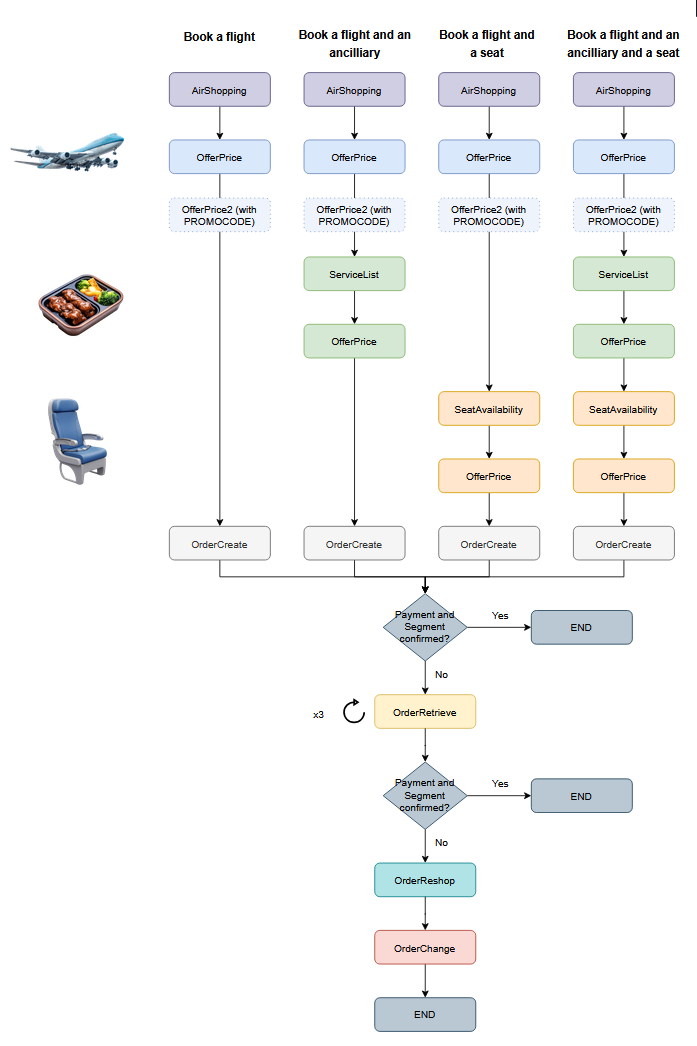
Each column represents a different use case, from a simple flight booking to a full booking with ancillary services and seat selection. The bottom section shows the post-booking confirmation flow, including the retry mechanism with OrderRetrieve (up to 3 attempts) and the fallback to OrderReshop if payment or segment confirmation fails.
Step-by-step booking flow
1. Search for flights — AirShopping
Search for available flights by providing origin, destination, dates, and passenger details. The response contains a list of offers with flight options and pricing.
- Endpoint:
POST /x3/ndc/api/Shopping/r3.x/v21.3/AirShopping - Returns: flight offers with schedules, fare details, and offer IDs.
- Next step: select an offer and confirm its price.
2. Confirm pricing — OfferPrice
Before creating a booking, confirm the price of the selected offer. Prices may change between search and booking, so this step ensures the latest fare is applied.
- Endpoint:
POST /x3/ndc/api/Selling/r3.x/v21.3/OfferPrice - Input: the offer ID from the AirShopping response.
- Returns: confirmed pricing, fare conditions, and the offer details needed to create an order.
3. Create the booking — OrderCreate
Create a booking (order) by providing passenger details and the confirmed offer.
Ancillary services (ServiceList) or seat maps (SeatAvailability) may optionally be requested using the offer ID beforehand, so they can be included in the booking from the start.
- Endpoint:
POST /x3/ndc/api/Selling/r3.x/v21.3/OrderCreate - Input: passenger information (names, contact details) and the priced offer.
- Returns: an order ID (booking reference) and the full booking details.
4. Browse available services — ServiceList (optional)
Retrieve the list of ancillary services available for the booking, such as extra baggage, meals, or priority boarding.
- Endpoint:
POST /x3/ndc/api/Selling/r3.x/v21.3/ServiceList - Input: the order ID.
- Returns: available services with descriptions and pricing.
5. Select seats — SeatAvailability (optional)
Check seat availability and select seats for the passengers in the booking.
- Endpoint:
POST /x3/ndc/api/Selling/r3.x/v21.3/SeatAvailability - Input: the order ID.
- Returns: a seat map with available seats and pricing.
6. Modify the booking — OrderChange (optional)
Add services, assign seats, or make other changes to an existing booking.
- Endpoint:
POST /x3/ndc/api/Servicing/r3.x/v21.3/OrderChange - Input: the order ID and the requested changes.
- Returns: updated booking details.
Other operations
| Operation | Endpoint | Purpose |
|---|---|---|
| AirlineProfile | GET /Shopping/r3.x/v21.3/AirlineProfile |
Retrieve available markets (routes) |
| OrderRetrieve | POST /Servicing/r3.x/v21.3/OrderRetrieve |
Retrieve an existing booking by order ID |
| OrderReshop | POST /Servicing/r3.x/v21.3/OrderReshop |
Search for alternative flights for an existing booking |
| OrderQuote | POST /Servicing/r3.x/v21.3/OrderQuote |
Get a price quote for changes before applying them |
API versions
The NDC Gateway supports two API versions for each endpoint:
| Version | Path pattern | Backend |
|---|---|---|
| v21.3 | /r3.x/v21.3/{Operation} |
Navitaire NDC API |
| v2 (DAPI) | /r3.x/v2/{Operation} |
Navitaire Digital API |
Both versions are available for all operations. The v21.3 endpoints follow the IATA NDC standard. The v2 (DAPI) endpoints use Navitaire's Digital API format.
Next steps
- See the Get Started page for environment URLs and authentication details.
- See the Reference documentation for the full request and response schemas.
- Download the Postman Collection to try the workflow interactively.


